Data Tracking - Troubleshooting
This section covers common issues and known errors you may encounter while working with Data Tracking, and describes steps to resolve or mitigate each one.
The following topics cover frequently reported scenarios, configuration issues, and system behaviors that can affect normal operation.
Missing Customizations
If you are unable to find a Salesforce object or field to track, this is usually related to missing Customizations.
Although tracking is performed on Salesforce objects and fields, their configuration depends on the Customization level. This means that:
- Objects and fields must first exist as Customizations in the system.
- If they aren't available, they can't be selected for tracking or filtering.
What to check
- Ensure the scanner has been executed for the relevant Salesforce types.
- Verify that the corresponding Customization exists in the system.
This applies to:
- Data Tracking configuration
- Filters used for generating Change Logs
Solution
If the Customization is missing, you need to run the scanner for the specific Salesforce types.
See Running the Scanner for instructions on how to run the scanner for specific Salesforce types.
Deployment Errors
When selecting certain standard Salesforce objects for tracking, you can encounter issues that prevent the trigger and its corresponding test class from being successfully deployed.
Some Salesforce objects have specific characteristics that can affect deployment.
Known Issue
Objects that don't have a Name field (such as Case or WorkOrder) can behave differently when:
- Automatically generating the test class
- Achieving the required minimum 75% code coverage for deployment
These cases have already been addressed in the current implementation.
Considerations
- Other standard objects might still have unique behaviors that could cause deployment conflicts.
- Errors during deployment are often related to how the test class is generated for those objects.
Suggested Actions
- Review the deployment error message to identify the affected object.
- Check if the object has any structural differences (e.g., missing common fields like
Name).
If you encounter a new conflicting object, you may need to investigate further or customize the configuration.
Test Class Dependencies
The system generates the test class for each tracking trigger using a dynamic template. This template includes the necessary structure and relationships required to create valid test records.
How it works
When the system creates a trigger, it automatically generates a corresponding test class. This test class:
- Inserts sample records
- Ensures the required 75% code coverage for deployment
To determine which fields and values are required for these test records, the system relies on:
Test Class SObject Dependency (Custom Metadata Type) and its associated records.
Example
When tracking an Approval Rule object (sbaa__ApprovalRule__c), the generated test class follows a predefined structure:
@isTest
public class SsbaaApprovalRulecTest {
  @isTest
  public static void testTrigger() {
    try {

        sbaa__ApprovalRule__c record_1 = new sbaa__ApprovalRule__c();
        record_1.Name = 'test';
        record_1.sbaa__TargetObject__c = 'Opportunity';
        insert record_1;

    } catch(Exception e) {}
  }
}
The required field values used in this test class are defined in the Custom Metadata configuration.
Configuration Reference
Test Class SObject Dependency – Custom Metadata Type
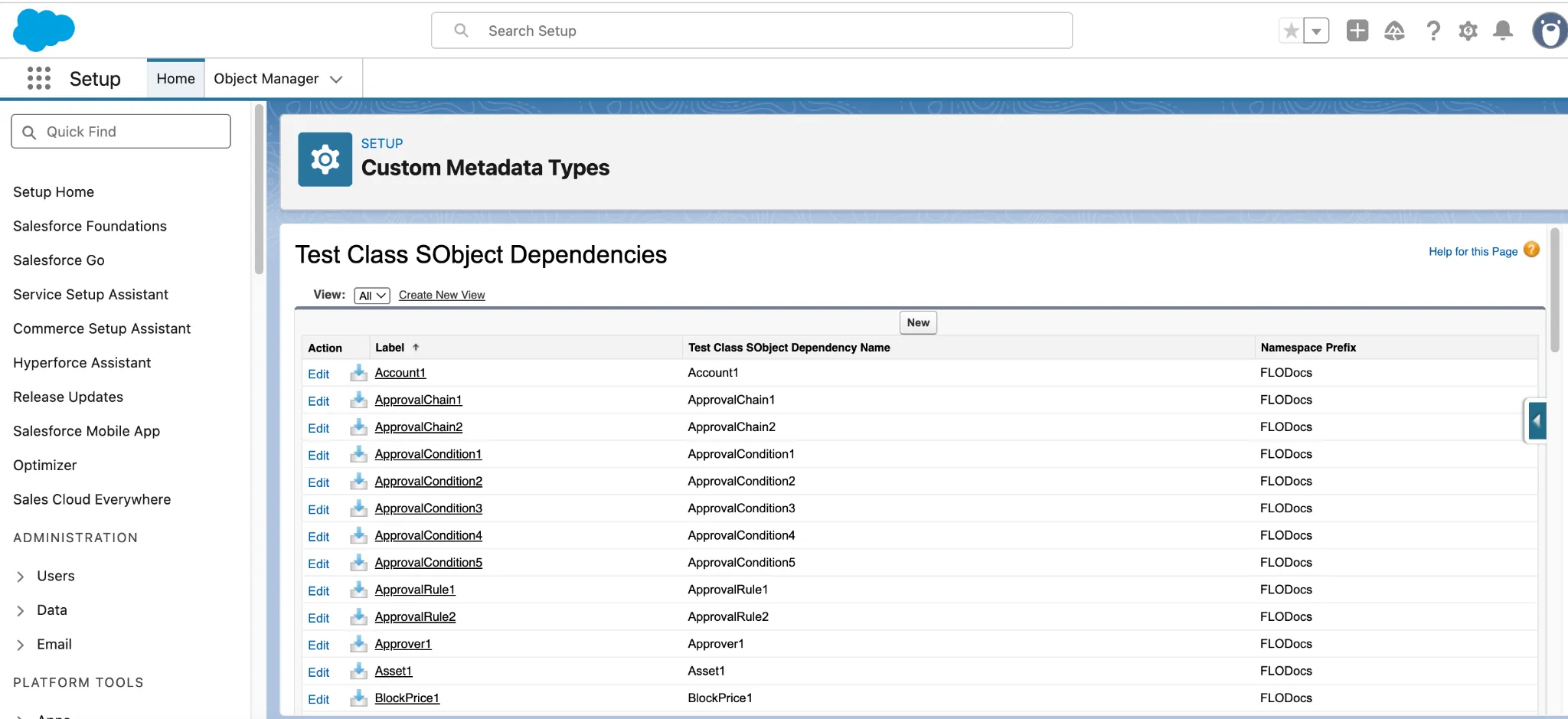
Example Configuration – ApprovalRule (CPQ) – Tracked Non-Blocking
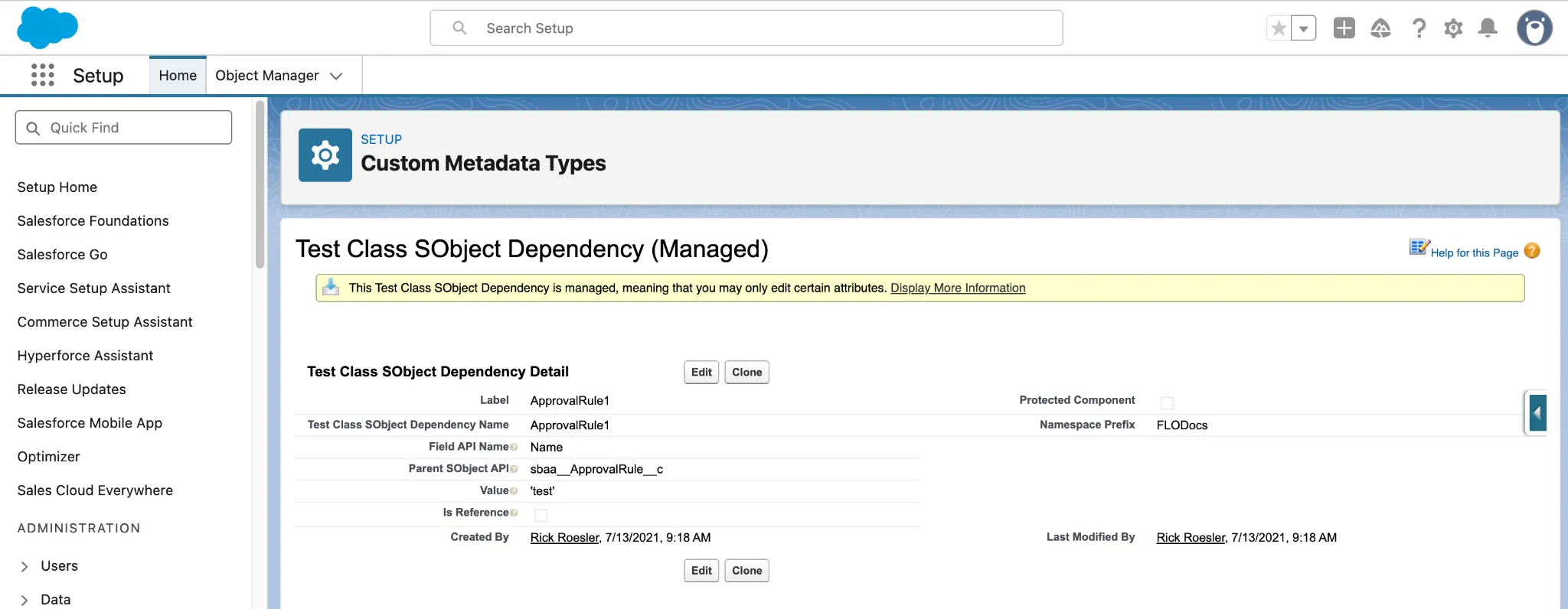
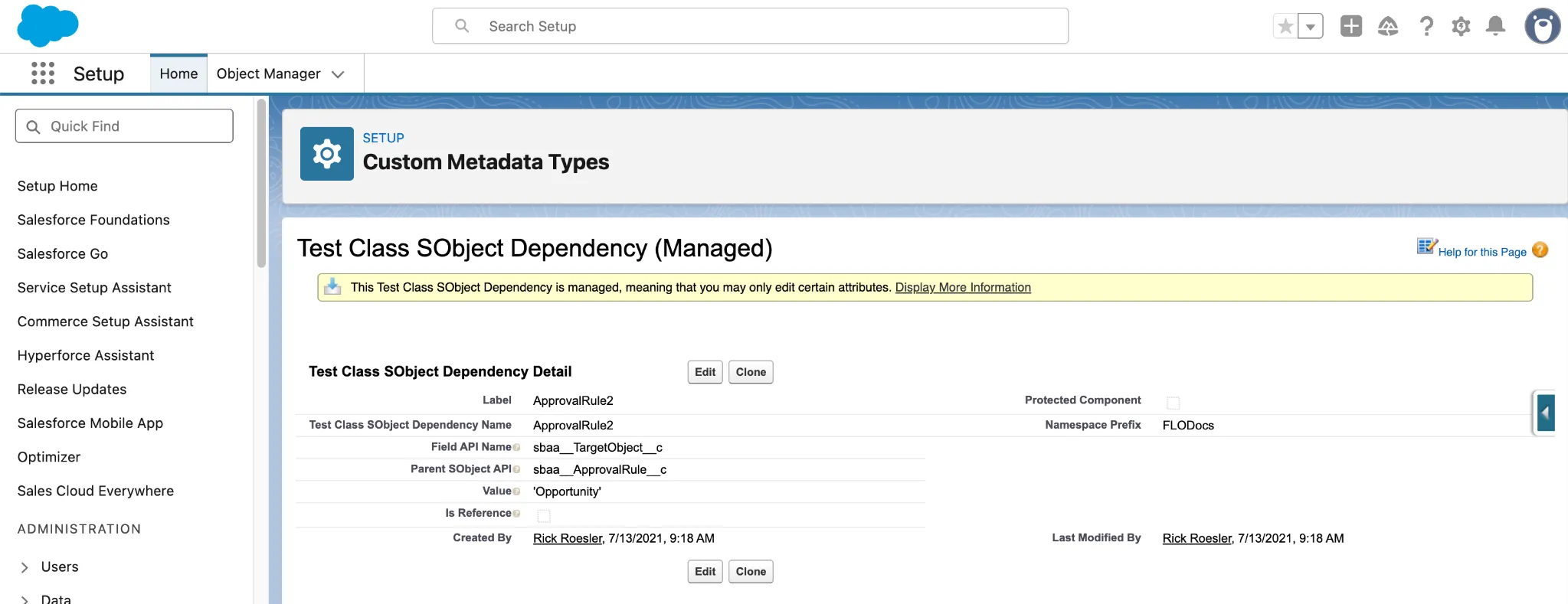
In this example, the configuration defines that a test record for sbaa__ApprovalRule__c must include:
- A value for the
Namefield (e.g.,"test") - A specific value for the
sbaa__TargetObject__cfield (e.g.,"Opportunity")
Common Issue
If the required dependencies aren't properly defined:
- The test class might fail during execution
- Deployment might fail due to insufficient code coverage or invalid data
Suggested Actions
- Verify that the correct dependencies are configured in the Custom Metadata Type
- Ensure all required fields and relationships are properly defined
- Update or add missing dependency records if needed
Proper configuration of these dependencies is essential for successful test class generation and deployment.
The Test Class SObject Dependency – Custom Metadata Type isn't a protected component. This means you can add or modify dependencies as needed without requiring a new package version.