What is a spider
The Spider searches your account and creates the documentation for your customizations. The spider includes dependencies for saved searches in standard and custom fields. The following items are documented by the spider:
| Custom Entity Fields | Mass Updates | User Roles |
| Custom CRM Fields | Suitelet | Custom Report |
| Custom Body Fields | RESTlet | Bundle |
| Custom Column Fields | User Event Script | Online Customer Form |
| Custom Item Fields | Scheduled Script | Custom Record Forms |
| Custom Item Options | Client Script | Group |
| Item Number Fields | Mass Update Script | Subsidiary |
| Other Fields | Portlet Script | Department |
| Custom Lists | Custom Workflow Action | Class |
| Custom Records | Bundle Installation Script | Location |
| Custom Record Fields | Map/Reduce Script | Custom Segment |
| Custom Entry Forms | Plug-In | Email Template |
| Custom Transaction Forms | Script Deployments | Custom Advanced PDF/HTML Template |
| Searches | Workflow |
There are three ways to use the Spider:
Manual Spider
Creates the initial documentation of your account. It fully documents your account by spidering all the customization records and updating every customization. The initial manual Spider runs as part of the installation process: Running the Spider.
When running the spider, you must keep the window open for the spider to continue working. Don't change roles or accounts during spidering. NetSuite security standards require an active Administrator log in to execute some of the spider’s tasks.
You can specify specific record types to focus the spider:
AutoSpider
The AutoSpider monitors your account on an ongoing basis to detect customization changes. It performs a light scan of the data. If changes are detected, it reminds you to ReSpider your account.
Best practice is to run the AutoSpider regularly. If the AutoSpider isn't run, your Change Logs are missing the Changed by and Actual Change Date fields. When the Change Log is newly created, the fields contain Pending AutoSpider. If too many days go by, the fields change to Couldn't be determined.
AutoSpider Portlet
The AutoSpider Portlet is set up as part of the installation process: Setting Up the AutoSpider and Alerts.
The AutoSpider Portlet is required to update certain object types in NetSuite. When triggered through the dashboard portlet, it picks up all changes on custom objects and triggers the scheduled scripts to reflect them in the Customization records, going back two days.
The AutoSpider portlet is required to update these object types:
- Bundle
- SuiteApp
- Saved Searches
- Custom Report
- Mass Update
- Record
- Online Customer Form
- Entry Form
- Transaction Form
- Address Form
- Custom Advanced PDF/HTML Template
- Group
- Access Token
- Integration
ReSpider Now
The ReSpider Now feature documents or updates documentation for a specific customization or set of customizations on demand. After you finish adding your new or updated objects to your customization record or change request, click ReSpider Now on your form. Documentation updates in real time. The following is an example of a customization record with the ReSpider Now option:
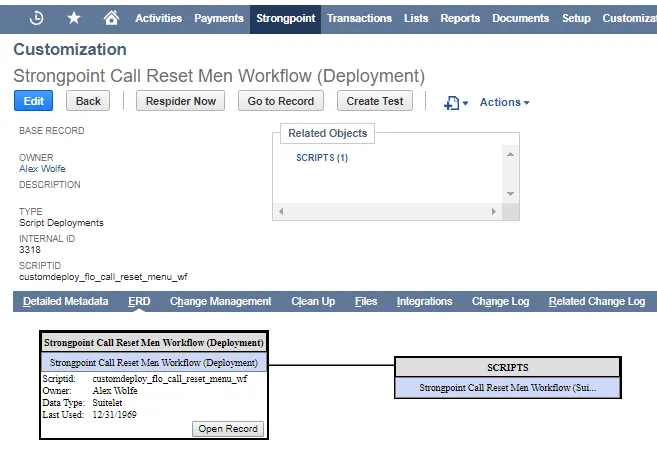
Proposed customizations don't work for custom forms and custom reports because they don't have Script IDs. For searches, ReSpider Now uses the permissions of the current logged-in user. If the user doesn't have the correct permission set, the search shows as private.