Archive Fields
When cleaning up your account with Platform Governance for NetSuite clean up tools, you may find fields that are no longer in use and need to be deleted. Create a Change Request and add the fields you want to delete.
Create a Change Request to Archive Fields
To create a change request:
-
Open Strongpoint > Change Management > Change Request
-
Fill out all relevant fields and include all the customization you want to delete in the Customizations field, add the customizations you want to delete.
-
Click Save.
-
Click the Impact Analysis button.
-
Under the Impact Analysis tab, the customizations you selected are listed under one or more tabs:
- Can Be Safely Deleted or Modified
- Cannot Be Safely Deleted or Modified or
- Inactive Customizations (Already Deleted)
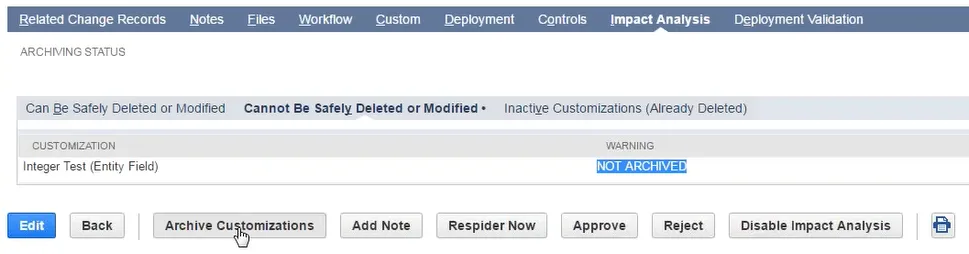
- Click the Archive Customizations if you find your customizations under Cannot Be Safely Deleted or Modified and under Warning it says Not Archived
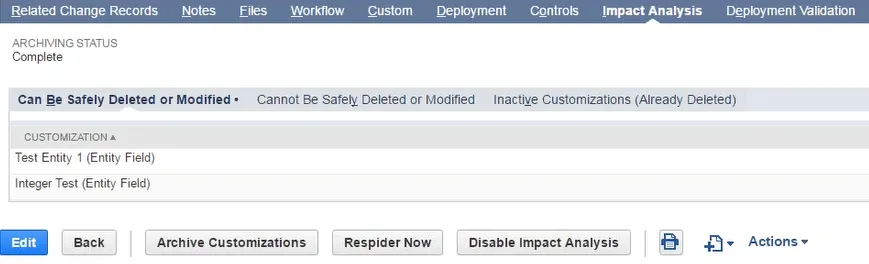
- After your customizations are processed and archived, they appear under Can be Safely Deleted or Modified. Your archive folder contains the CSV file you can download. The file name includes the field type and the script ID.