Netwrix Strongpoint for Netsuite 7.1 Release Notes
Core 7.1.2.1
November 30, 2023
- Support links changed December 1st. The new link is https://www.netwrix.com/support.html.
- NetSuite changes, such as moving an account to a different datacenter, are now treated as a Platform change. They don't create a non-compliant Change Log record.
- Improved handling of custom employee center roles across the Strongpoint spiders.
- Bundle updates were enabling Automatic Synchronization between Strongpoint and Jira, changing settings where Automatic Synchronization was disabled. Automatic Synchronization defaults to enabled for new installations. Refer to Jira topic for more information.
- Enhanced handling of nonmaterial changes for fields using html coding. Special symbols ( < > & " ) in fields don't generate non-compliant change logs.
- Improved handling of the Date Last Used script to avoid time limit errors.
Core 7.1.2
November 2, 2023
- Removed People Related to Customization search from the Strongpoint > Customization menu.
- Increased the number of employees and roles for User Provisioning per run. If there are more than the limit, multiple runs are processed. The User Provisioning Error field reports the Change Request is in process until all of the runs are complete.
- Improved handling of Affected Employees if an error occurs during provisioning. The error only appears once per employee.
- Eliminated duplicate logs on script Type customizations occurring when Resider Now was run after the Strongpoint Create System Note CL scheduled script.
- Added system notes for changes to the Company Preference and Account Preference.
- Removed the Token Based Authentication Setup note link from Environment Compare.
- Improved ReSpider Now to prevent duplicated change logs.
- Improved handling of Non-material change workflow instances.
- Improved handling of platform changes on the Record type. Non-compliant change logs aren't generated for permissions and links sublists it the permittedrole or linkcenter is empty. The change is noted in the log.
Core 7.1.1.1
October 16, 2023
- Change Log Evaluation: Change logs related to workflows were labeled with a Scripted Object change type. The labeling caused discrepancies in the change log evaluation.
- Search Functionality: The Execute as Admin Workflows search wasn't displaying data, even when executed workflows were present.
Core 7.1.1
September 20, 2023
-
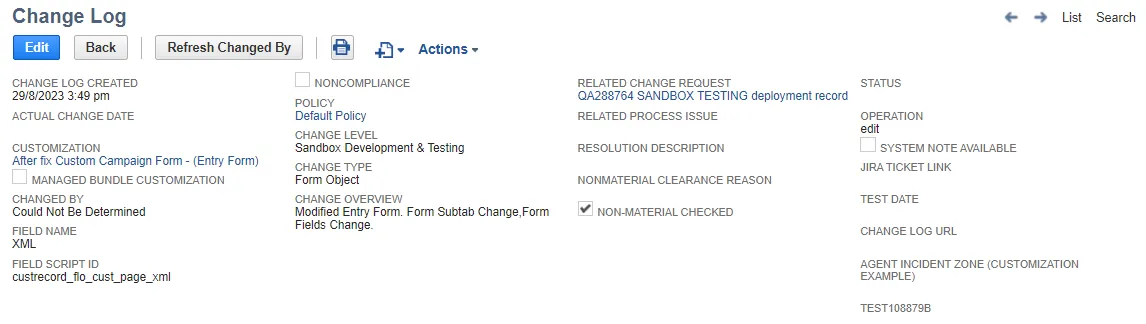
Added Refresh Changed By button to refresh change information on Change Logs. If the Actual Change Date is empty or Change By is set to Couldn't Be Determined or Pending Autospider, a Refresh Changed By button is available. When clicked, it populates Actual Change Date and Change By fields.
The button is only available for Object types where Strongpoint can retrieve the Actual Change Date and Change By fields.
-
Removed an extraneous Customization record link in Search Clean Up notification emails. Non-Strongpoint users who receive the notification cannot use the link.
Core 7.1
August 23, 2023
Every release contains internal enhancements and customer-specific bug fixes to keep Strongpoint running smoothly.
NetSuite Release 2023.2 Support
The Strongpoint Searches have been updated to support NetSuite's change of Formula (Text) Fields to the new Formula (HTML) Fields. This is a NetSuite security enhancement.
Install Strongpoint 7.1 before the NetSuite 2023.2 release to ensure a smooth upgrade:
- Install Strongpoint 7.1 in your Sandbox by August 15th.
- Test Strongpoint 7.1 before August 22nd. Contact your Customer Success Manager if you have questions.
- Strongpoint 7.1 was pushed to your production environment starting August 23rd.
NetSuite began pushing release 2023.2 at the end of August.
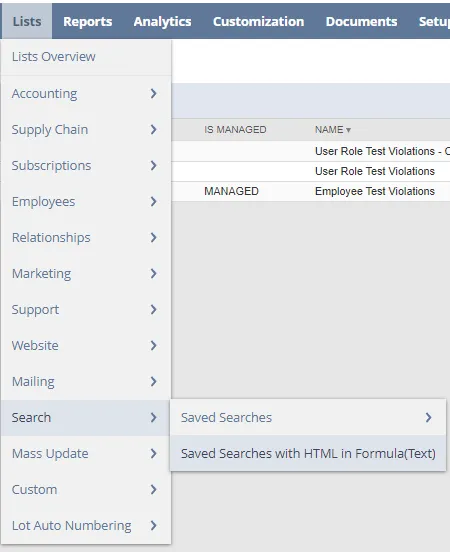
If you have custom searches, you must update them to support the NetSuite change. To view the list of saved searches in your account that contain code in Formula(Text) fields, open: Lists > Search > Saved Searches with HTML in Formula(Text)
SoD 1.6.2
November 3, 2023
-
Updated the email template to include the Affected Employee details when an SoD Exemption is updated to Pending Approval. The approver sees the following details:
- Any related SOD Exemptions for the Affected Employee where Status = Approved
- Affected Employee
- Related Exemption Name
- Related Exemption Reason for Exemption
- Related Exemption Affected Rules
- Related Exemption Affected Roles
SoD 1.6.1
September 20, 2023
Improved handling of Proposed User Roles and Proposed Global Permissions in the SoD Approval Form.
SoD 1.6
August 23, 2023
NetSuite Release 2023.2 Support
The Strongpoint Searches have been updated to support NetSuite's change of Formula (Text) Fields to the new Formula (HTML) Fields. This is a NetSuite security enhancement.
Install Strongpoint 7.1 and SoD 1.6 before the NetSuite 2023.2 release to ensure a smooth upgrade:
- Install Strongpoint 7.1 and SoD 1.6 in your Sandbox by August 15th.
- Test Strongpoint 7.1 and SoD 1.6 before August 22nd. Contact your Customer Success Manager if you have questions.
- Strongpoint 7.1 and SoD 1.6 were pushed to your production environment starting August 23rd.
NetSuite began pushing release 2023.2 at the end of August.
Jira 1.3
November 30, 2023
- Support links changed December 1st. The new link is https://www.netwrix.com/support.html.
Jira 1.2.16
September 27, 2023
- Improved handling of the Jira Token field. It is now stored as an API Secret in NetSuite. Refer to https://suiteanswers.custhelp.com/app/answers/detail/a_id/98285 for details on NetSuite API Secrets.
- Improved handling of the Change Request owner assignment. Owner is now the person who pushed the ticket into NetSuite.
Jira 1.2.15
- Replaced the persistent popup message in the Strongpoint Jira integration when project restricted access is in effect. You see a static note in the tab if you don't have access, instead of a more intrusive popup message requiring interaction. (Jira On-prem was updated August 2023, Jira Cloud updated November 2023)
Jira 1.2.14
-
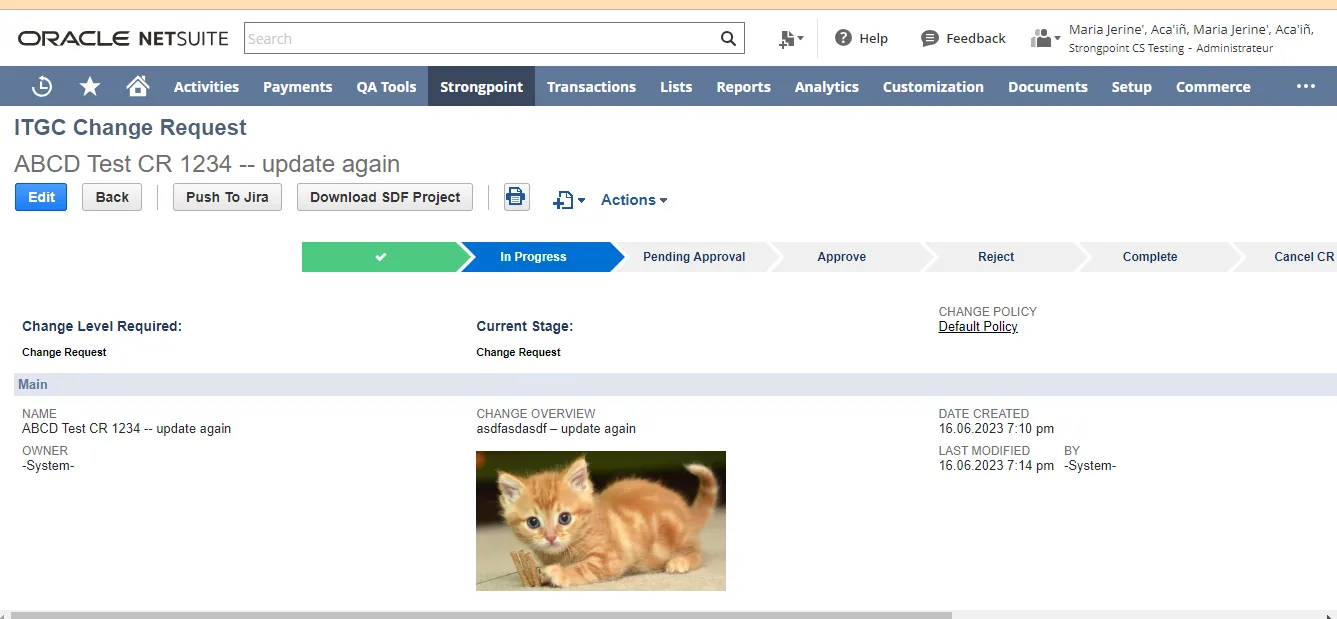
Added the ability to receive and store images attached in the Jira description by Jira ticket ID.
Jira 1.2.13
The following are the enhancements for the release:
- Change customization name to allow Single quotes (').
- Added Location to the Type dropdown on the Add Proposed Customization form.
Jira 1.2.11
The following are the enhancements for the release:
- Import Customizations from Jira
- Enable Allow NS to Jira Push (must be done before creating a ticket from NetSuite to Jira)
- Create Ticket from NetSuite to Jira
- Change customization name to allow Single quotes (').
- Added Group to the Type dropdown on the Add Proposed Customization form.
Import Customizations from Jira
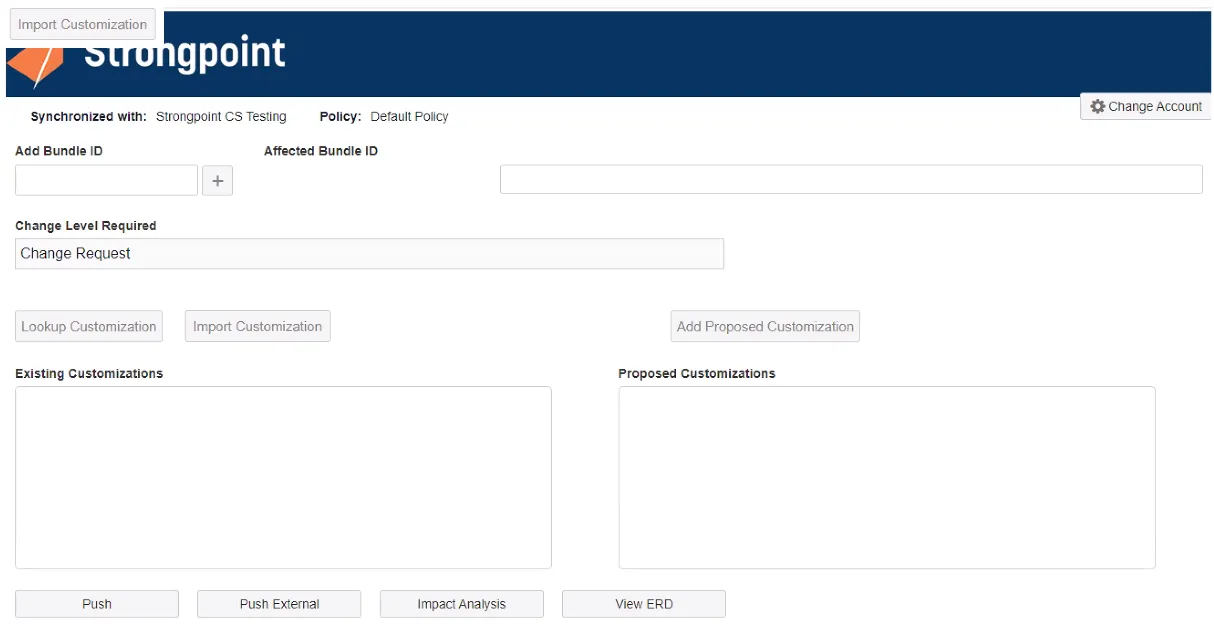
An Import Customization button has been added to the Jira Strongpoint form. You can import an
xml file exported from a Jira ticket.
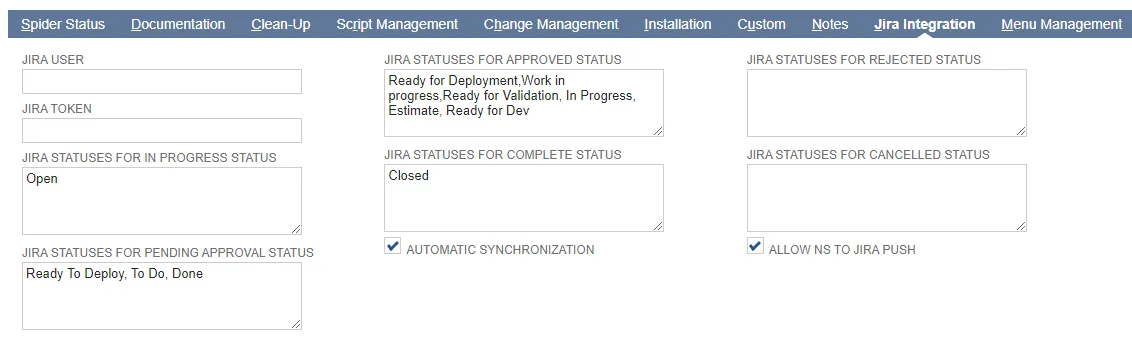
Enable Allow NS to Jira Push
This feature must be enabled before you can create tickets from NetSuite to Jira.
-
Open Strongpoint > Strongpoint Support > Installation Settings
-
Open the Jira Integration tab
-
Check Allow NS to Jira Push to enable pushing NetSuite change requests into Jira.
Create Ticket from NetSuite to Jira
Create Ticket from NetSuite to Jira must be enabled before you can create tickets from NetSuite to Jira.
- Create or open a change request in Strongpoint.
- Add your information and customizations.
- Click Push to Jira.
- Select your Jira project.

- Click Push. A Change Request Pushed message appears. Click Close.
- Open the Related Change Records tab. The ticket number is added as an External Change
Request Number. CM-15 in this example.

- Open Jira.
- Navigate to CM-15 ticket.

- Click Strongpoint NetSuite. The customizations from the change request are added.

Jira 1.2.10
The following are the enhancements for the release:
- Credentials are now persistent, and don't need to be entered every time.
- Strongpoint Settings page added to Jira
Strongpoint Settings for Jira
The Strongpoint Settings app is accessed through Jira. Use it to create your Token Based Authentication (TBA) credentials for your account. After creation, they are available for easy selection when performing your tasks.
Token-Based Authentication is set up through NetSuite. Refer to Setting up Token-Based Authentication.
-
Open Jira.
-
Open your Projects page:

-
Expand Add-ons.
-
Select Strongpoint Settings.
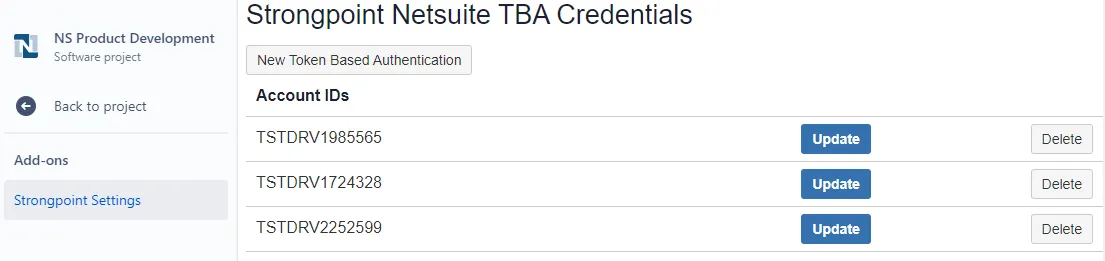
-
Click New Token Based Authentication to add your credentials. This needs to be done once for each of your accounts.

-
Enter your credentials and click Add Token Based Authentication Credential.
ServiceNow Integration 1.1.5
November 2, 2023
- Token-based Authentication is now a requirement. The Basic Authentication login form is deprecated.
- Improved formatting for Add Proposed Customization IDs.
User Access Review 1.0.2
October 13, 2023
-
Added a GL Impact field and a Permission Risk Severity dropdown to the Permission record. GL Impact field is a Y/N choice. Permission Risk Severity can be High, Medium, Low, or Null (default).
-
Added GL Impact and Permission Risk Severity filters to the Permission Revews lists.
-
Added GL Impact and Permission Risk Severity columns to the Permission Review.

-
Added new roles and permissions for UAR users:
- Strongpoint UAR Admin
- Strongpoint UAR Owner
- Strongpoint UAR Additional Reviewer
- Strongpoint UAR Auditor