Clearing a Control Incident
Unresolved Control Incidents appear in the Unresolved Control Incidents Report.
To clear or resolve a control incident:
-
Open Strongpoint > Financial Controls > Unresolved Control Incidents
-
Click the Customization to display the incidents.
-
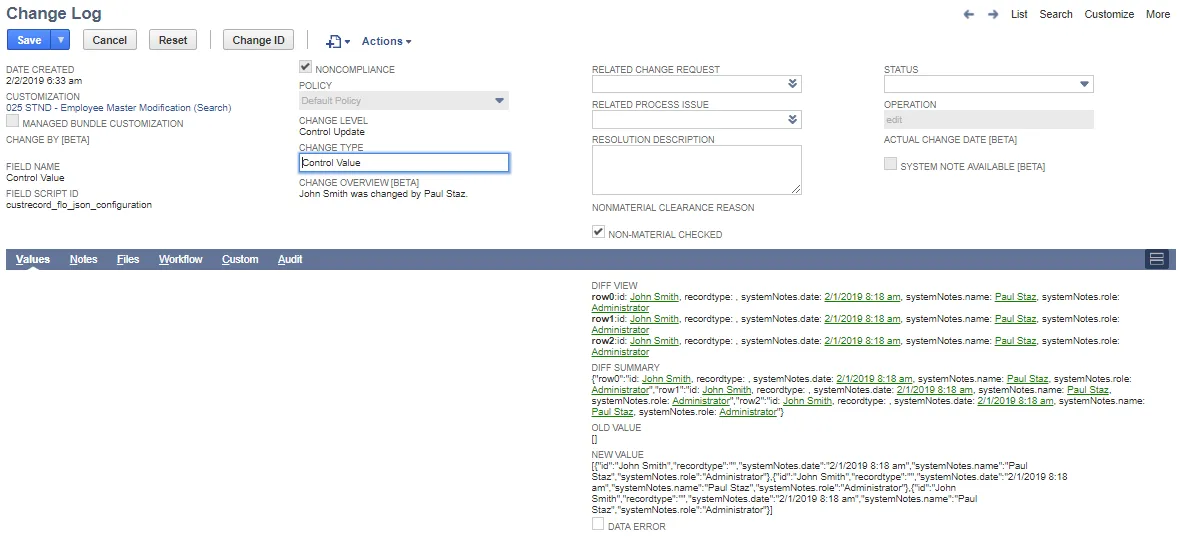
Click Edit on the Incident record to clear/resolve.
-
Add the Resolution Description.
-
Set Status to Closed.
-
Save the Change Log.
The incident moves from Unresolved Control Incident Log to Resolved Control Incident Log.
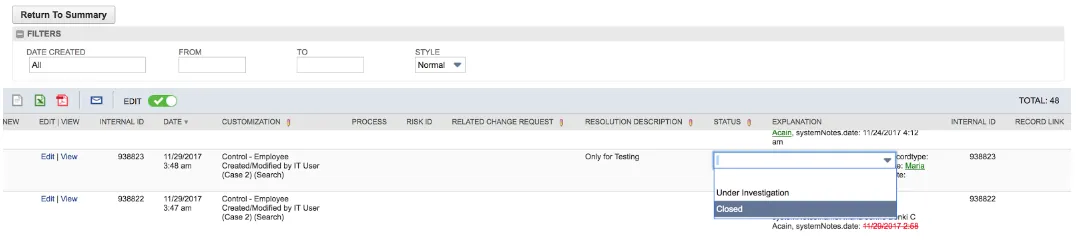
You can also clear an incident by inline editing the Unresolved Control Incidents Report:
- Click EDIT in the report tool bar. When enabled, it is green with a check mark.
- Click the red pencil icon in the column head. Columns without the pencil icon can't be edited.
- Click in the column to open a text box.