Assign policies to users
Password Policy Enforcer (PPE) uses policy assignments to decide which policy to enforce for a user. You can assign domain policies to users, groups, and containers (Organizational Units, or OUs). You can assign local policies only to users. See Domain and Local Policies to learn how domain and local policies differ.
Domain policy assignments for users and groups reference the object's Security Identifier (SID), so they remain valid even if the user or group is renamed. Local policy assignments reference the username directly, so renaming the user invalidates the assignment.
Add a policy assignment
-
Open the PPE Configuration Console.
-
Click the name of a policy in the policy list.
-
Select the Users & Groups tab.

-
Click the + beside Users, Groups, or Containers/OUs to add an assignment of that type. The Configuration Console displays a selection dialog box to help you select the users, groups, or OUs you want.
-
Click OK to add the assignment. The entry appears under the corresponding list.

You can have different assignment types for a policy. For example, you may assign users to a policy by both OU and group at the same time.
Remove a policy assignment
- Select the names of the users, groups, or OUs that you want to remove.
- Click the trash can beside Users, Groups, or Containers/OUs to remove the selected assignments of that type.
Policy assignment inheritance
When you assign a policy to a group, PPE enforces the policy for all members of the group as well as any nested groups. For example, if the Helpdesk group is a member of the Info Tech group, then any policy assigned to the Info Tech group also applies to the members of the Helpdesk group. If you want to override the inherited policy, then assign a different policy to the Helpdesk group directly.
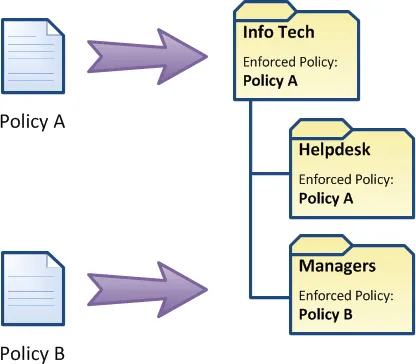
When you assign a policy to an OU, PPE enforces the policy for all users in the OU as well as any child OUs. For example, if the Helpdesk and Managers OUs are children of the Info Tech OU, then any policy assigned to the Info Tech OU also applies to the two child OUs. If you want to override the inherited policy, then assign a different policy to a child OU directly.
Policy assignment conflicts
A policy assignment conflict occurs when more than one policy is assigned to a user. Password Policy Enforcer can resolve these conflicts and choose one policy for each user.
PPE first tries to resolve a policy assignment conflict by examining the assignment type. Assignments by user take precedence over assignments by group, and assignments by group take precedence over assignments by container. For example, if you assign Policy A to a user by group, and Policy B to the same user by container, then PPE enforces Policy A because assignments by group take precedence over assignments by container.
If you assign all the policies to the user by container, then PPE enforces the policy assigned to the nearest parent container. For example, if you assign Policy A to the Users OU, and Policy B to the Users\Students OU, then PPE enforces Policy B for all users in the Users\Students and Users\Students\Science OUs because it's the policy assigned to the nearest parent container.
If a policy assignment conflict still exists, then PPE checks the priority of each remaining policy, and enforces the policy with the highest priority.
The default policy
Password Policy Enforcer enforces the default policy for any user who doesn't have a policy assigned to them through a user, group, or container assignment. See Set the default policy to learn how PPE uses the default policy and how to exempt specific users from it.
If Password Policy Enforcer has only one policy, and that policy is also the default policy, then PPE enforces the policy for all users. If you want to deploy a single policy gradually, don't make it the default until the deployment is complete.
Check which policy is enforced for a user
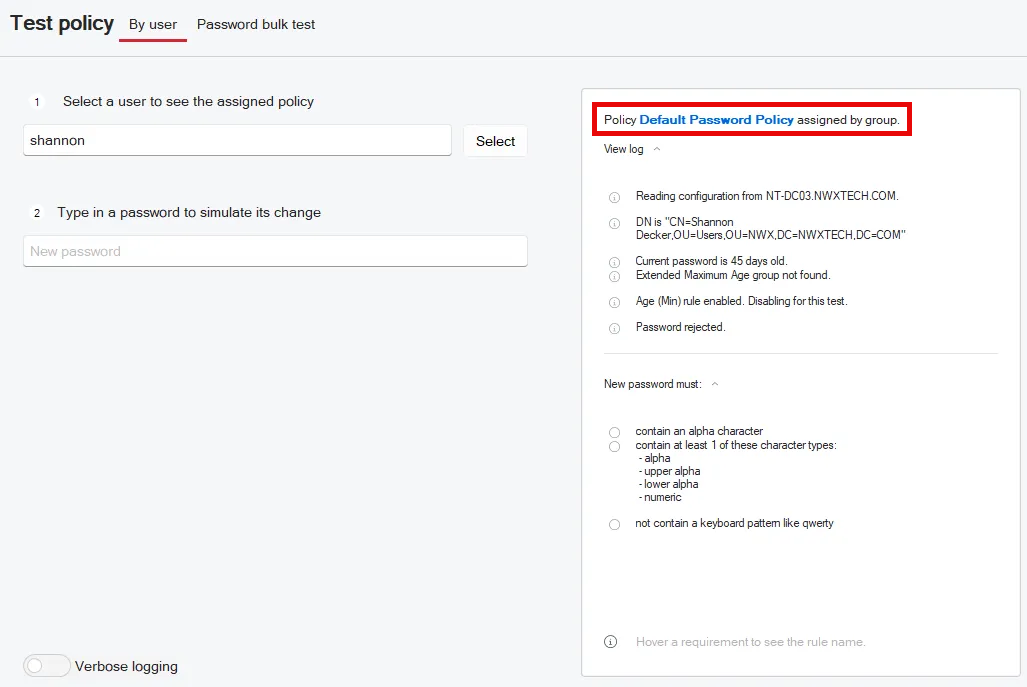
Use the Test Policy by User feature to check which policy PPE enforces for a user. Enter a username on the left, and the right pane shows the enforced policy.
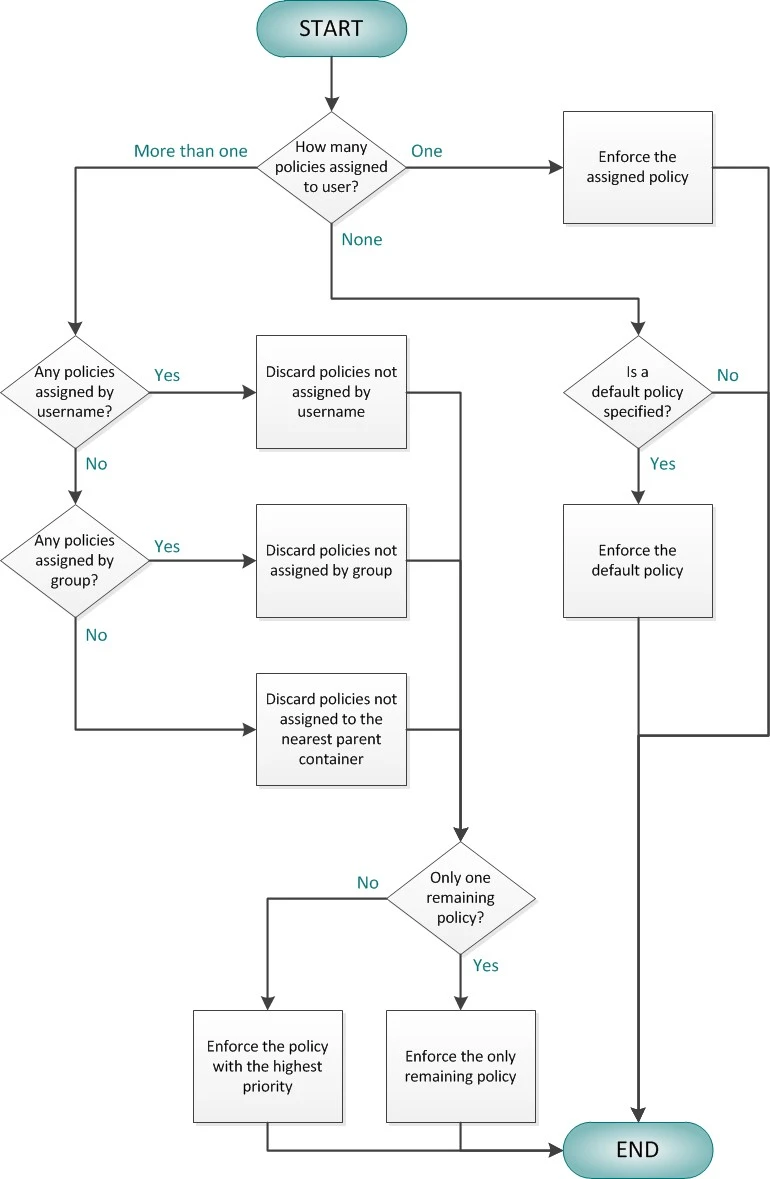
Policy selection flowchart
This flowchart shows how Password Policy Enforcer determines which policy to enforce for a user.