Patterns rule
The Patterns rule rejects passwords that contain sequential character patterns like abcde and keyboard patterns like qwerty. Passwords with predictable character patterns are easier to guess and crack.
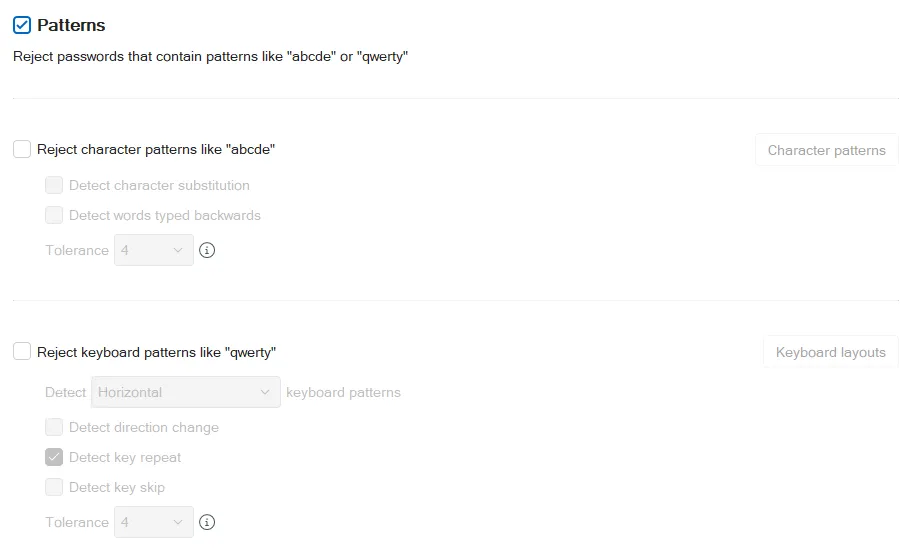
Sequential character patterns
Select the Patterns checkbox at the top of the page, then select the Reject character patterns like "abcde" checkbox to reject passwords containing sequential character patterns.
Select the Detect character substitution checkbox if you want Password Policy Enforcer (PPE) to apply character substitutions when checking passwords.
Select the Detect words typed backwards checkbox if you want PPE to test passwords with their characters reversed. For example, PPE also evaluates the password zyxwdrowssap as passwordwxyz.
Select a value from the Tolerance dropdown to specify the maximum number of consecutive matching characters that PPE tolerates before rejecting a password. For example, passwordwxyz contains a four-character sequential pattern (shown in bold). PPE rejects this password if the tolerance is three or lower, and accepts it if the tolerance is four or higher. The Auto value rejects passwords only if the entire password is a sequential character pattern. For example, PPE rejects the password abcde, but not abcdez or abcd123.
Click Character patterns to select which sequential character patterns PPE detects.

Keyboard patterns
Select the Patterns checkbox at the top of the page, then select the Reject keyboard patterns like "qwerty" checkbox to reject passwords containing keyboard patterns.
Select a value from the Detect dropdown to specify the types of keyboard patterns PPE detects. The Horizontal value only detects horizontal patterns like qwerty and zxcvbn. The Vertical value only detects vertical patterns like 4esz and 4rfc. The Horizontal or vertical value detects patterns in both directions.
Select the Detect direction change checkbox if you want PPE to detect direction changes in keyboard patterns. For example, PPE recognizes qwewq and 4rfr4 as five-character keyboard patterns if you select Detect direction change.
PPE detects direction changes in both directions if you select Horizontal or vertical. For example, PPE identifies qawsed, qwedsa, qwedcv, and qwsazx as six-character keyboard patterns if you select Detect direction change and set Detect to Horizontal or vertical.
Select the Detect key repeat checkbox if you want PPE to continue matching the keyboard pattern when a key is repeated. For example, PPE recognizes qwwert and qwwwer as six-character keyboard patterns if you select Detect key repeat.
Select the Detect key skip checkbox if you want PPE to continue matching the keyboard pattern when a key is skipped horizontally or vertically. For example, PPE recognizes qwryui as a six-character keyboard pattern if you select Detect key skip.
Select a value from the Tolerance dropdown to specify the maximum number of consecutive matching characters that PPE tolerates before rejecting a password. For example, the password passqwerword contains a four-character keyboard pattern (shown in bold). PPE rejects this password if the tolerance is three or lower, and accepts it if the tolerance is four or higher.
Click Keyboard layouts to select which international keyboard layouts PPE detects.
