Dictionary rule
The Dictionary rule rejects passwords that are vulnerable to guessing, hybrid, and precomputed attacks. These attacks can crack weak passwords in seconds, and they are very effective if users base their passwords on common words.
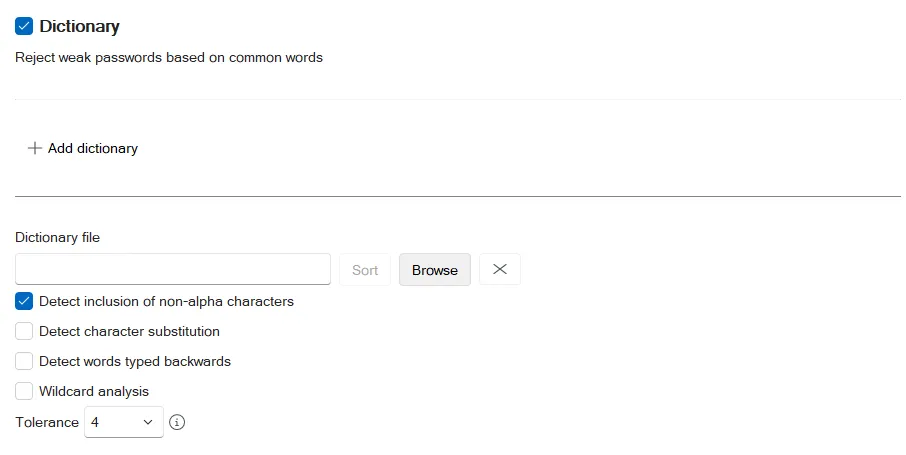
Select the Dictionary checkbox to enable the Dictionary rule.
Click Browse to select a dictionary file, or enter a path to a file in the Dictionary file text box. The path can include environment variables. Password Policy Enforcer (PPE) installs a file called Dict.txt in the %ProgramFiles%\Netwrix\Password Policy Enforcer\ folder. This file contains approximately 278,000 words, names, and acronyms.
Dictionary files are UTF-8-encoded text files with a specific format. They must begin and end with a blank line, contain one fully capitalized word per line, and list words in ascending alphabetical order.
Click Sort to format and sort the current dictionary file. You only need to do this once after adding words to the file or creating a new file. Sorting also removes duplicate words, so the sorted file may be smaller than the original. The included dictionary is ready to use, so there's no need to sort it.
Ensure that all computers have a local copy of the updated and sorted file. The Dictionary file replication section explains how to automate this.
Dictionary files should be on a local disk. Shared dictionary files degrade performance and might jeopardize security.
Future versions of Password Policy Enforcer might overwrite Dict.txt during an upgrade, so rename the file or put it in a different folder if you modify it.
Select the Detect inclusion of non-alpha characters checkbox if you want PPE to ignore non-alphabetic characters in passwords. For example, PPE also evaluates the password myp8asswor8d as mypassword.
Select the Detect character substitution checkbox if you want PPE to apply character substitutions when checking passwords.
Select the Detect words typed backwards checkbox if you want PPE to test passwords with their characters reversed. For example, PPE also evaluates the password drowssapym as mypassword.
Select the Wildcard analysis checkbox if you want PPE to search for wildcard templates in dictionary files. Wildcard templates are specially formatted dictionary words that PPE uses to reject a range of passwords. There are two wildcard template formats:
| Format | Example | Description |
|---|---|---|
| Prefix | !!BAN*!! | Rejects passwords that start with BAN. For example, band, banish, ban, bank, etc. |
!!2*!! | Rejects passwords that start with the numeric character 2. For example, 2ABC, 2123, etc. | |
| Suffix | !!*ING!! | Rejects passwords that end with ING. For example, pushing, howling, trying, etc. |
Wildcard analysis increases search times slightly, so only enable it if the dictionary file contains wildcard templates. The dictionary file included with PPE doesn't contain any wildcard templates.
PPE performs partial matching even if you disable wildcard analysis. For example, the dictionary word password rejects the passwords MyPassword$, Password100, and 12password34 even if you disable wildcard analysis.
Select a value from the Tolerance dropdown to specify the maximum number of consecutive matching characters that PPE tolerates before rejecting a password. For example, the dictionary word sword and the password 4mysword% contain five consecutive matching characters (shown in bold). PPE rejects this password if the tolerance is four or lower, and accepts it if the tolerance is five or higher.
Click Add dictionary if you want PPE to use a secondary dictionary file. This is useful if you want to keep your own words in a separate file, or if you need different settings for the second file. Clicking Add dictionary displays a second group of identical configuration settings for the secondary file.
A secondary dictionary can be combined with the passphrase feature to enforce a password policy that allows dictionary words in passphrases, while still rejecting certain words such as the organization's name, seasons, local sporting teams, etc. Configure the passphrase feature to disable only the primary dictionary file for passphrases, and keep the secondary (smaller) dictionary file enabled for all passwords.
Dictionary file replication
Password Policy Enforcer doesn't distribute dictionary file updates to other computers, but you can use Distributed File System Replication (DFSR) to ensure that all domain controllers use the same file. Copy the dictionary file into the Sysvol share on one domain controller, and configure the Dictionary rule to read the file from the local Sysvol path (%SystemRoot%\SYSVOL\domain\<your.domain>\filename.txt). DFSR copies the file into the Sysvol share of all the other domain controllers in the domain, so all domain controllers read their local copy of the distributed file.