Manage policies
Password Policy Enforcer (PPE) can enforce up to 256 different password policies per domain. Password policies are collections of rules that users must comply with when choosing a new password. You can assign policies to users directly, or indirectly through Active Directory security groups and containers (Organizational Units).
PPE doesn't enforce any policies when it is first installed, so the policy list is empty when you open the configuration console for the first time.
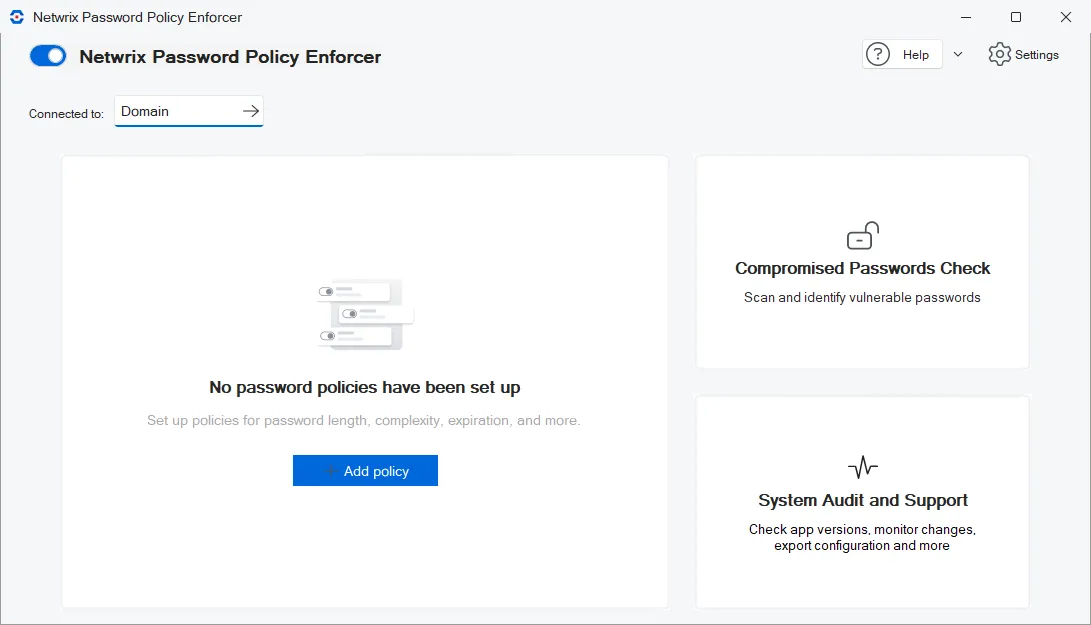
PPE adds the policies you create to the policy list. Use the buttons above the policy list to test policies, set policy priorities, and export the configuration. Use the options menu (⋮) to the right of each policy to perform actions on that policy.

Add a policy
- Click Add policy to create a new password policy.
- Enter a unique name for the policy.
- Select a Policy template from the list if you want the default settings in the policy to match a standard password policy like HIPAA, PCI, NIST, and others. Select None to start with a blank policy.
- Click Create policy.
The policy editor opens. The policy editor has many settings. The following pages explain the settings in each tab:
Edit a policy
Click the name of a policy in the policy list to make changes to the policy.
Test policies
Click Test Policy to check if Password Policy Enforcer's current configuration accepts or rejects specific passwords. The Test Policy feature is a useful troubleshooting tool when PPE isn't accepting or rejecting passwords as you expect.
Set policy priorities
Policy priorities help Password Policy Enforcer resolve policy assignment conflicts. If more than one policy is assigned to a user, and PPE can't decide which policy to enforce using the other conflict resolution rules, then PPE always enforces the policy with the highest priority.
Click Set priorities to view or modify policy priorities. This button is only visible if you have more than one password policy.
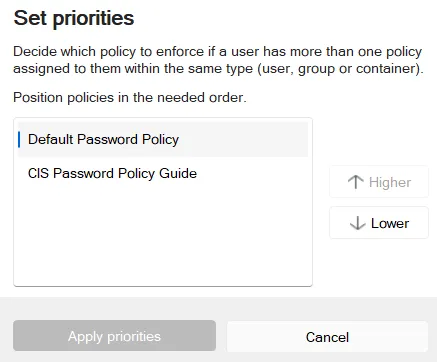
Select the policy you want to reprioritize, then click Higher or Lower to move the policy up or down. Click Apply priorities to accept the new priority order.
The Assign Policies to Users page has more information about how PPE assigns policies and resolves conflicts. You can also click Test Policy to quickly see which policy PPE enforces for a particular user.
Export configuration
Click Export to create an HTML configuration report in %ProgramFiles%\Netwrix\Password Policy Enforcer\Report\report.html.
Policy options menu
Click the policy options menu to perform one of the following actions on the policy. The policy options menu appears as three vertical dots (⋮) to the right of each policy in the policy list.

Copy a policy
Click Make copy in the policy options menu to create a new policy with the same default settings as the existing policy. Policy names must be unique, so PPE prompts you to enter a new name. The policy editor opens so that you can make changes to the new policy immediately.
Set the default policy
Password Policy Enforcer enforces the default policy for users who don't have an assigned password policy. Click Make default or Remove default in the policy options menu to toggle the default state of a policy. There can only be one default policy.
Netwrix doesn't recommend using PPE without a default policy because it might leave some passwords unchecked. If you want to have a default policy, but still exempt some users from having to comply with PPE's rules:
- Create a new policy for the exempted users.
- Leave all the rules disabled for this policy.
- Assign the policy to the users who don't have to comply with any PPE rules.
If Password Policy Enforcer has only one policy, and that policy is also the default policy, then PPE enforces the policy for all users. If you want to deploy a single policy gradually, don't make it the default until the deployment is complete.
Rename a policy
Click Rename in the policy options menu to rename a policy.
Delete a policy
Click Delete in the policy options menu to delete a policy. Password Policy Enforcer displays a second confirmation prompt if you try to delete the default policy. PPE doesn't assign a new default policy after you delete the default policy. You must set a new default policy manually.