Backup and Recovery Solutions
Implementing effective backup and recovery solutions is essential for safeguarding your system data and ensuring operational continuity. This section covers the key methods for performing system backups, restoring data, and managing migrations.
System Backup
The System Backup feature allows you to create and manage comprehensive backups of your system. Using the web interface or administrative console, you can perform backups, restore previous versions, and set up automatic routines to ensure your data is consistently protected.
Migration readiness checklist (preflight validation)
Before creating a migration backup and restoring it on a new Endpoint Protector Server, validate the items below to avoid failed imports/restores.
Source appliance (current server)
- Ensure you can successfully create a System Backup v2 (Migration) and that you securely save the System Backup Key (required for restore).
- Download any previous System Backups or Audit Log Backups you want to keep (these are not preserved through the migration process).
- Confirm the resulting backup file is within the supported size limits (see note below). If it is not, contact Customer Support before proceeding.
Target appliance (new server)
- Deploy the new Endpoint Protector Server on a newer version than the source (migration restore is intended for a newer server version).
- Ensure the new appliance has enough free disk space for the restore operation (backup file + temporary restore data).
- Plan the cutover: after restore, power off the old appliance and reassign its IP to the new one so existing clients reconnect.
If your migration involves upgrading the server from a pre-5206 version to 5.7.0.0, database partitions must be enabled prior to the upgrade. Contact Customer Support for assistance.
Creating a System Backup v2 (Migration)
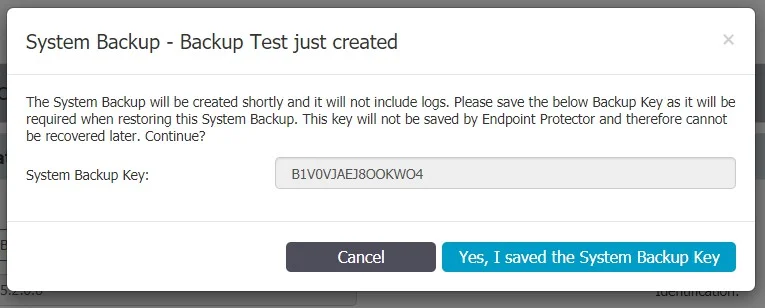
You can create a new migration backup from the System Maintenance, System Backup v2 section.

For security purposes, the System Backup Key will not be stored by the Endpoint Protector. Before proceeding, make sure it is properly saved.
Importing and Restore (Migrate)
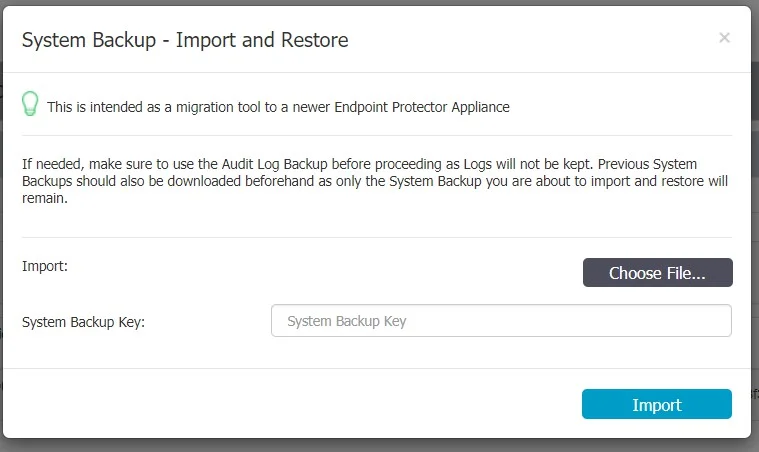
A backup can be restored on the same Endpoint Protector Server. However, the main use case would be to import and restore the backup on a newer Endpoint Protector Server (e.g.: version higher than 5.2.0.6).
The migration process of a System Backup requires the backup file and System Backup Key.
If needed, previous System Backups or Audit Log Backups should be downloaded prior to this step, as they will not be kept in process.
After the Import and Restore (Migration) has been made to the new Appliance, the old Appliance should be turned off. Its IP would then have to be reassigned to the new Appliance in order for the deployed Endpoint Protector Clients to start communicating with the new Appliance.
Once deleted, a backup cannot be recovered.
The Endpoint Protector Server cannot process backup files larger than 200 MB. If a created backup file exceeds this limit, we recommend that you contact Customer Support for assistance.