Configure Local Audit Policies
Configure local audit policies on the target servers to capture the "Who" and "When" values for changes to the following monitored system components:
- Audit policies
- File shares
- Hardware and system drivers
- General computer settings
- Local users and groups
- Services
- Scheduled tasks
- Windows registry
- Removable media
You can also configure advanced audit policies for the same purpose. See Configure Advanced Audit Policies for the steps.
Manual Configuration
While there are several methods to configure local audit policies, this topic covers one of them: how to configure policies locally with the Local Security Policy snap-in. To apply settings to the whole domain, use the Group Policy but consider the possible impact on your environment.
To configure local audit policies:
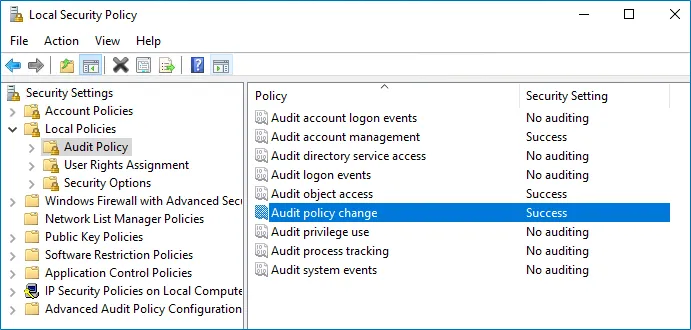
Step 1 – On the audited server, open the Local Security Policy snap-in: navigate to Start > Windows Administrative Tools > Local Security Policy.
Step 2 – Navigate to Security Settings > Local Policies > Audit Policy.
Step 3 – Configure the following audit policies.
| Policy Name | Audit Events |
|---|---|
| Audit account management | "Success" |
| Audit object access | "Success" |
| Audit policy change | "Success" |
Local audit policy configuration is complete.